Logo Logo v2.1
Image Description Image Description

No Results

  • Get Support
  • Preview Demo
Logo Logo v1.0.0
  • Documentation
  • Introduction
  • Theme Requirements
  • Installation
  • Theme Installation
  • Plugin Installation
  • Demo Installation
  • Page
  • Create a New Page
  • Build Page using Elementor
  • Page Title
  • Site Configuration
  • Header
  • Footer
  • Contact Form
  • Contact Form
  • Post
  • Create Post
  • Post Category
  • Widget
  • Add & Edit Widget
  • Elementor
  • Edit With Elementor
  • Elementor Widgets
  • Support
  • Support System

Create a Category

  1. Navigate to Post > Categories
  2. Name the category and fill to other section below.
  3. Hit Add New Category. Your new Category will aprear in the table of all category immediately.
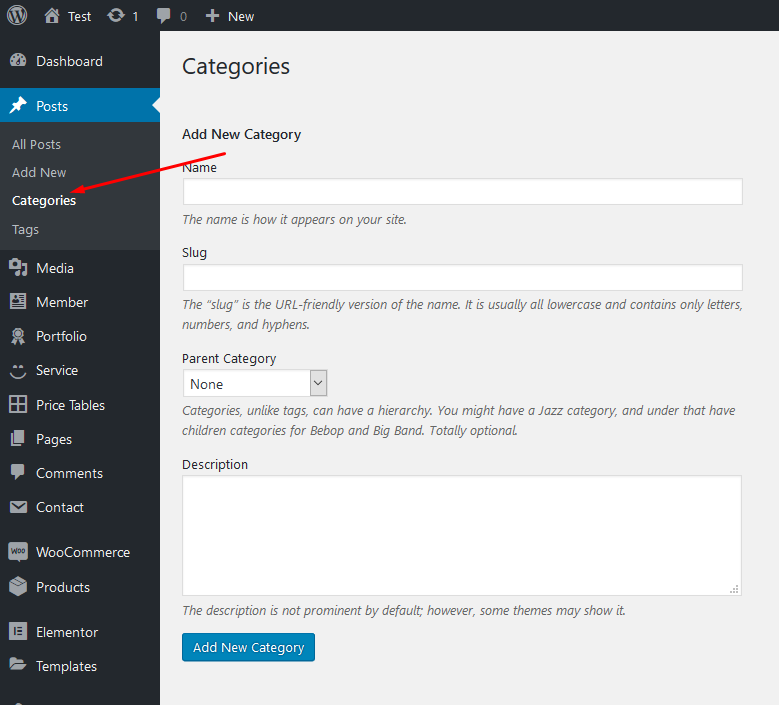
category

Similar to Category, you can create a new Tag in the same way.